Core concepts
The Veracity Asset Model allows you to view or edit the system that has been instantiated, as well as the taxonomy used. The same functionality is available...
The Veracity Asset Model allows you to view or edit the system that has been instantiated, as well as the taxonomy used. The same functionality is available using APIs.
https://assetmodel.veracity.com
Core concepts
The Veracity Asset Model is a platform capability that provides a unified Asset Registry, enabling multiple services to store, manage, and access metadata for assets such as solar plants, wind farms, vessels, and more. Its purpose is to ensure consistent and standardized representation of assets across services and technologies. By offering a common naming standard for describing assets, it facilitates seamless data exchange between services (e.g., analytics, monitoring, reporting) and reduces duplication and misalignment.
When modelling assets such as solar plants and wind farms, predefined system types are used. These system types are defined according to the Reference Designation System (RDS) for the given domain. Veracity Asset Model allows administrators to define a referece system containing of assets (systems) with the properties and signals associated with them.
Two concepts often arise when describing how systems are structured: Reference Designation System (RDS) and taxonomy. Although related, they serve different purposes.
What is a Reference Designation System (RDS)?
A Reference Designation System (RDS) is a formal engineering method for identifying and structuring technical systems, components, and functions. It originates from industrial standards such as IEC/ISO 81346, widely used in energy sectors—including wind turbines and solar plants.
Key characteristics of RDS:
- Structured and rule‑based: Uses defined principles to assign identifiers to systems and components (e.g. =A1 +M1 -05). Currently Assety Model do not support the identifiers and autogenrating he aspects. This is planned features.
- Engineering‑oriented: Reflects how the system is designed, built, and maintained.
- Hierarchical: Supports multi‑level breakdowns (plant → system → subsystem → component).
- Unambiguous: Ensures consistent naming across OEMs, sites, and organizations.
Note: OEM stands for Original Equipment Manufacturer—the equipment vendor that designs and manufactures the asset components (e.g., wind turbine, inverter, controller suppliers).
What RDS is used for
- Defining what a system is and how it is positioned in the overall plant structure.
- Providing a consistent foundation for properties, signals, documents, configurations, and maintenance data.
- Supporting interoperability across asset owners, operators, and equipment vendors.
What is a Taxonomy?
A taxonomy is a way of classifying and organizing items into categories. It is commonly used in data catalogs, ontologies, and metadata systems.
Key characteristics of a taxonomy:
- Classification‑centric: Focuses on grouping similar things (e.g. “Solar Inverters”, “Wind Turbine Controllers”).
- Flexible and descriptive: Defines categories, not engineering rules.
- Not inherently tied to engineering standards: Taxonomies describe types of systems, not plant‑specific designations.
- Semantic grouping: Helps users find, filter, and understand system types.
What a taxonomy is used for
- Organizing assets into categories for easier browsing and analytics.
- Defining types of systems (e.g., “Pitch System”, “Inverter System”) rather than unique, site‑specific identifiers.
- Supporting discoverability, reusability, and metadata mapping.
Relationship Between RDS and Taxonomy in Veracity
Users with specific access rights define their own Reference Designation System (RDS) for their domain, which results in a structured taxonomy of system types with associated properties/signals. The RDS encompasses:
- System types
- Datatypes
- Blueprints
Before asset instances can be created, the relevant taxonomy must be published. A taxonomy is organized into technologies, which group system types and govern write access to them.
System types
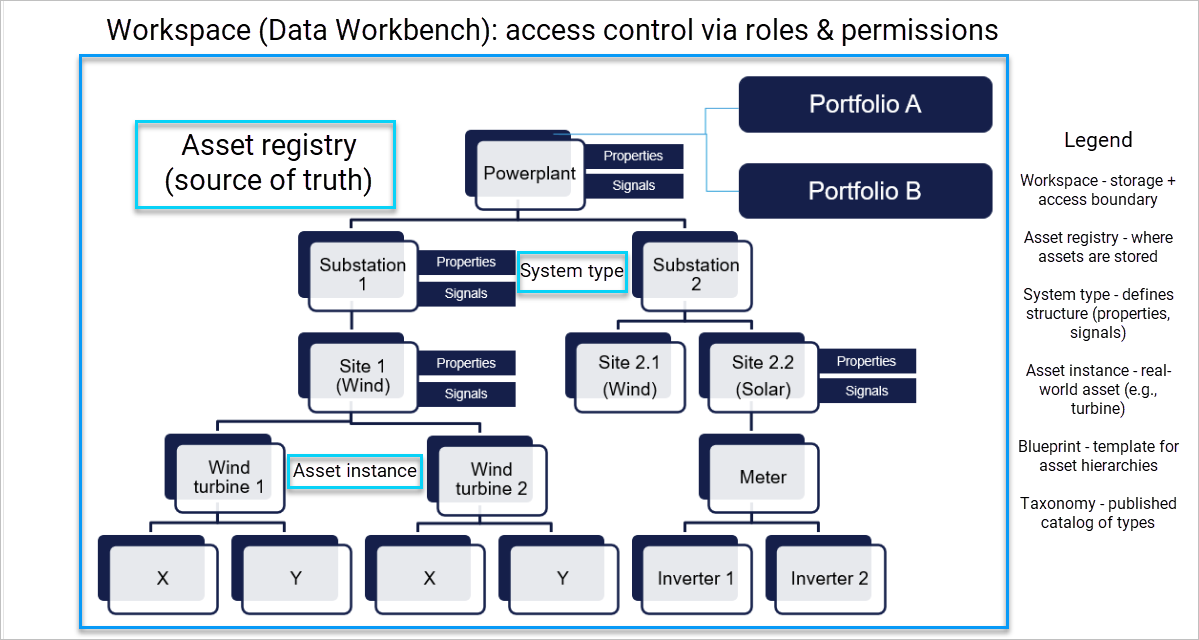
Each system type includes a list of properties and a list of signals:
- Properties: Descriptive attributes that characterize the asset, e.g., Manufacturer, RatedPower, Location.
- Signals (if applicable): Definitions of sensor-related attributes, e.g., Voltage, Temperature, EnergyOutput.
- Technologies: System types are grouped under broader technology domains such as Solar, Wind, Storage, and Maritime.
- Datatypes: Standardized data formats used across technologies to ensure consistent representation of metadata and signal values.
Blueprints
Blueprints define reusable hierarchical templates composed of system types. They enable consistent construction of asset structures, such as predefined turbine configurations. When an asset instance is created using one or more blueprints, the complete hierarchy is instantiated according to these templates.
Asset Instance
Asset instances represent real-world assets. They are created based on system type definitions and include actual metadata values (e.g., Manufacturer = Siemens, RatedPower = 3.2 MW). An asset instance can consist of a single system type or a structured hierarchy of related systems. These hierarchies can be constructed by:
- Instantiating individual system types.
- Applying one or more blueprints.
In addition to properties values, an asset instance may include the set of signals monitored for that specific asset.
Asset registry
The Asset Registry is the database containing instantiated assets and their associated metadata. It serves as the single source of truth for asset information across services, ensuring consistency, reducing duplication, and enabling aligned data usage throughout the platform.
Access control
Each asset model is associated with a workspace in Data Workbench. Access to the asset model is governed by the workspace’s access control settings. Users and service principals with permission to access data within the workspace can also access the asset models tied to that workspace.
Workspace
A workspace in Veracity Data Workbench functions both as a repository for operational data related to assets and as the access control boundary. It ensures that asset data, metadata, and associated services operate within a secure and governed environment.