Authentication for APIs
Each call to an API within the Veracity ecosystem should provide a relevant access token placed in the of the request as a .
Each call to an API within the Veracity ecosystem should provide a relevant access token placed in the Authorization header of the request as a Bearer token.
Note that your API needs to handle authorization internally because Veracity Identity Provider (Veracity IDP) does not do that.
Your API should follow the process outlined below.
- Receive the incoming request and extract the
Bearertoken from theAuthorizationheader. - Validate and decode the token (see below).
- Look up if the user has permission to perform the requested operation (for example, the API can access its database of users indexed by
userIdclaim from the access token and retrieve additional information). - If the token is valid and the user has permission to do an action, perform the request and return a response.
For old APIs, see the known security flaw.
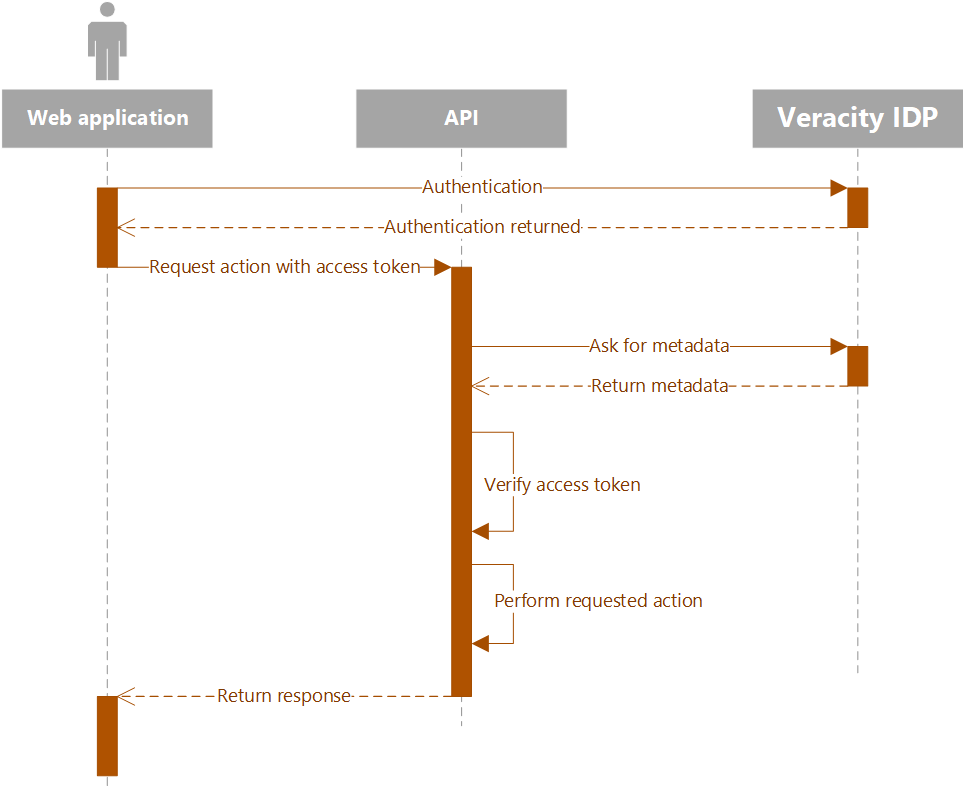
Validate access token
To validate the access token, your API needs additional information about OAuth configuration for Veracity IDP. You can get this information from the metadata endpoint:
https://login.veracity.com/{tenantid}/v2.0/.well-known/openid-configuration?p={policy}
Before calling the endpoint, replace the placeholders with the following parameters.
| Parameter | Value |
|---|---|
| Tenant ID | a68572e3-63ce-4bc1-acdc-b64943502e9d |
| Policy | B2C_1A_SignInWithADFSIdp |
Below you can see a sample response from the metadata endpoint.
{
  "issuer": "https://login.veracity.com/a68572e3-63ce-4bc1-acdc-b64943502e9d/v2.0/",
  "authorization_endpoint": "https://login.veracity.com/a68572e3-63ce-4bc1-acdc-b64943502e9d/oauth2/v2.0/authorize?p=b2c_1a_signinwithadfsidp",
  "token_endpoint": "https://login.veracity.com/a68572e3-63ce-4bc1-acdc-b64943502e9d/oauth2/v2.0/token?p=b2c_1a_signinwithadfsidp",
  "end_session_endpoint": "https://login.veracity.com/a68572e3-63ce-4bc1-acdc-b64943502e9d/oauth2/v2.0/logout?p=b2c_1a_signinwithadfsidp",
  "jwks_uri": "https://login.veracity.com/a68572e3-63ce-4bc1-acdc-b64943502e9d/discovery/v2.0/keys?p=b2c_1a_signinwithadfsidp",
  "response_modes_supported": [
    "query",
    "fragment",
    "form_post"
  ],
  "response_types_supported": [
    "code",
    "code id_token",
    "code token",
    "code id_token token",
    "id_token",
    "id_token token",
    "token",
    "token id_token"
  ],
  "scopes_supported": [
    "openid"
  ],
  "subject_types_supported": [
    "pairwise"
  ],
  "id_token_signing_alg_values_supported": [
    "RS256"
  ],
  "token_endpoint_auth_methods_supported": [
    "client_secret_post",
    "client_secret_basic"
  ],
  "claims_supported": [
    "dnvglAccountName",
    "myDnvglGuid",
    "userId",
    "oid",
    "name",
    "given_name",
    "family_name",
    "sub",
    "email",
    "upn",
    "mfaType",
    "mfa_required",
    "authenticatedBy",
    "iss",
    "iat",
    "exp",
    "aud",
    "acr",
    "nonce",
    "auth_time"
  ]
}
When validating the token:
- Conform to current best practices for OAuth token validation.
- Validate the token's signature using the relevant JSON Web Token key. For a list of public key signatures, see the
jwks_uriendpoint in the metadata. - Optionally, read more about validating the signature.
This lets you confirm that the token:
- Was issued by Veracity.
- Is not expired.
- Was signed by Veracity IDP.
However, suppose any of the validation steps fail. In that case, your API must reject the token and return a 401 Unauthorized response indicating to the calling code that the token is invalid and you will not handle the request.