Authentication
The Data Platform APIs use for authentication.OAuth 2.0
The Data Platform APIs use OAuth 2.0 for authentication.
All API requests require:
- A Bearer token (OAuth 2.0 access token)
- An API key (for request routing and access control)
You can authenticate using one of two flows:
- Client credentials flow (service-to-service)
- Authorization code flow (user-based access)
Authentication flows
Authorization code flow (user-based access)
The authorization code flow is designed for scenarios where an application needs to act on behalf of a signed-in user. It ensures that access to APIs is tied to the user’s identity and permissions. In contrast to service accounts, the authorization code flow ensures that security and data access are always aligned with the individual user’s identity, rather than a shared application identity.
Key characteristics:
- User interaction required: The user signs in via a browser and grants consent.
- Delegated access: The token represents the user and their permissions.
- Short-lived tokens: Improves security.
- Refresh tokens: Allow obtaining new access tokens without re-authentication.
Use this flow when:
- You need user-specific access control.
- Actions must be audited per user.
- Your application includes a UI or login experience.
- Access must reflect what the user is allowed to do.
For more details, see:
Authentication for APIs
Client credentials flow (service accounts)
The client credentials flow is used when an application needs to authenticate as itself, without a user context. This is also referred to as service account authentication.
Typical use cases:
- Backend services calling Data Platform APIs.
- Integration or ingestion scripts.
- Scheduled jobs or CI/CD pipelines.
Service accounts
Service accounts represent non-user identities used by applications or services.
You can create and manage service accounts in Data Workbench → API management.
A service account can be scoped to a specific workspace or to the entire tenant.
Service account credentials
When creating a service account, you receive:
- Service account ID (
client_id) - Service account secret (
client_secret) - API key
- Base URL
How they are used:
- The client ID + secret are exchanged for an access token.
- The access token is used to call APIs.
- The API key must be included in request headers (when required).
- The base URL is combined with specific API endpoints.
Getting an access token
To obtain an access token (used as Bearer token in API requests), send a POST request to the OAuth 2.0 token endpoint with the following parameters:
| Token url | https://login.microsoftonline.com/dnvglb2cprod.onmicrosoft.com/oauth2/token |
| client_id | service account id |
| client_secret | service account secret |
| resource | https://dnvglb2cprod.onmicrosoft.com/83054ebf-1d7b-43f5-82ad-b2bde84d7b75| |
| grant_type | client_credentials |
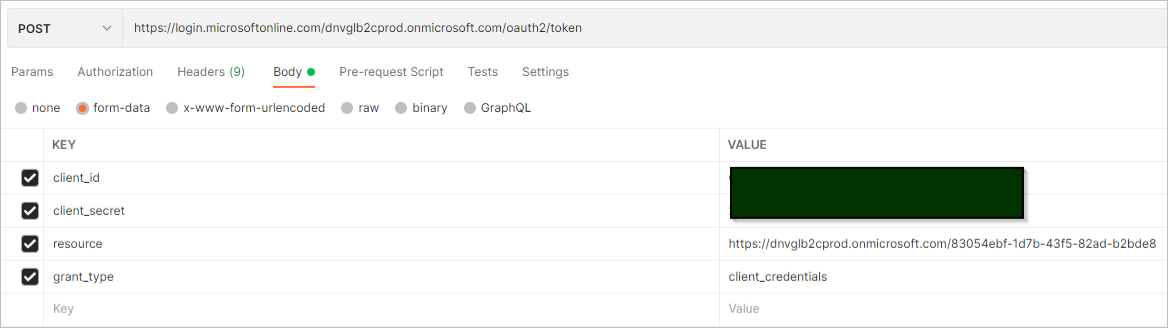
Example when running from Postman:
Python example
token_url = "https://login.microsoftonline.com/dnvglb2cprod.onmicrosoft.com/oauth2/token"

# Token payload for authentication request
token_payload = {
    "grant_type": "client_credentials",
    "client_id": client_id,
    "client_secret": client_secret,
    "resource": "https://dnvglb2cprod.onmicrosoft.com/83054ebf-1d7b-43f5-82ad-b2bde84d7b75"
}

# Function to retrieve access token
def get_token():
    try:
        response = requests.post(token_url, data = token_payload)
        return response.json()["access_token"]
    except Exception as e:
        print(f"Failed to retrieve access token: {e}")
C# example
async Task<string> GetToken()
{
    var url = "https://login.microsoftonline.com/dnvglb2cprod.onmicrosoft.com/oauth2/token";
    var client_id = "[client id]";
    var client_secret = "[secret]";
    var grant_type = "client_credentials";
    var resource = "https://dnvglb2cprod.onmicrosoft.com/83054ebf-1d7b-43f5-82ad-b2bde84d7b75";

    var postData = new Dictionary<string, string>
       {
           {"grant_type", grant_type},
           {"client_id", client_id},
           {"client_secret", client_secret},
           {"resource", resource},
       };
    using HttpClient httpClient = new HttpClient();
    httpClient.BaseAddress = new Uri(url);
    HttpRequestMessage request = new HttpRequestMessage(HttpMethod.Post, httpClient.BaseAddress);
    request.Content = new FormUrlEncodedContent(postData);
    HttpResponseMessage authResponse = httpClient.PostAsync(url, new FormUrlEncodedContent(postData)).Result;
    var result = await authResponse.Content.ReadAsStringAsync();
    var token = (string)JToken.Parse(result)["access_token"];
    return token;
}
Using authentication in API requests
Include the token and API key in your request headers:
Authorization: Bearer token
Ocp-Apim-Subscription-Key: API key
Terminology mapping (for Microsoft users)
If you are familiar with Microsoft Entra ID (Azure AD) or OAuth 2.0, the following table shows how the concepts in this platform map to standard Microsoft terminology.
| Data Platform term | Microsoft terminology | What it means |
|---|---|---|
| Service account | Confidential client / Application | A non-user identity used by applications or services to authenticate |
| Service account ID | Client ID (Application ID) | Unique identifier of the application |
| Service account secret | Client secret | A credential used to authenticate the application and obtain tokens |
| Credentials | Client credentials | The set of values (client ID + secret/certificate) used for authentication |
| Service account authentication | Client credentials flow | OAuth 2.0 flow where the application authenticates as itself (no user) |
| Platform APIs | Resource server / Protected API | The API that requires a valid access token |
| API access | Application permissions | Permissions granted directly to the application by an admin |
| Workspace access level (Reader/Admin) | App roles / RBAC roles | Defines what the application is allowed to do |
| Access to datasets | Scoped permissions | Restricts access to specific resources |
| Authorization code flow | Delegated flow | Flow where a user signs in and grants access |
| API key | (Not part of OAuth) | Platform-specific key used for routing, subscription, or context |
| Base URL | API endpoint / Resource URL | The base address of the API |
A service account in Data Platform is conceptually equivalent to a confidential client (application) using the OAuth 2.0 client credentials flow. The service account uses its credentials to obtain an access token, which is then used to authorize API requests.