Authentication and authorization
The Veracity Identity Provider (Veracity IDP) uses the industry standard protocol built on flows to authenticate users.OpenID Connect (OIDC)OAuth 2.0
Authentication with the Veracity identity provider
The Veracity Identity Provider (Veracity IDP) uses the industry standard OpenID Connect (OIDC) protocol built on OAuth 2.0 flows to authenticate users.
After authentication, the Veracity IDP generates a verifiable JSON Web Token (JWT) that contains basic user information. Because these standards are widely adopted, many libraries are available that can help you add authentication to your application.
Prerequisites
Before you can authenticate calls using the Veracity IDP:
- Create a service in Veracity.
- If you plan to run your service in production, onboard your service.
- Ensure your application follows current requirements for protecting user data.
User data obtained from the Veracity IDP must be handled according to applicable local and international laws. When your application receives personal data from the Veracity IDP, you become responsible for securing it.
Follow these guidelines:
- Request only the information your application needs.
- Avoid storing user data when possible.
- Delete stored data when it is no longer necessary.
- Ensure that user data is handled securely within your application or service.
Authentication scenarios
Veracity IDP supports two common authentication scenarios depending on how your application operates.
| Scenario | Description |
|---|---|
| Applications with direct user interaction | Web or native applications where users sign in through the Veracity IDP login page. |
| Applications without direct user interaction | Services such as APIs that receive requests containing authentication tokens. |
Choose the scenario that matches your application architecture.
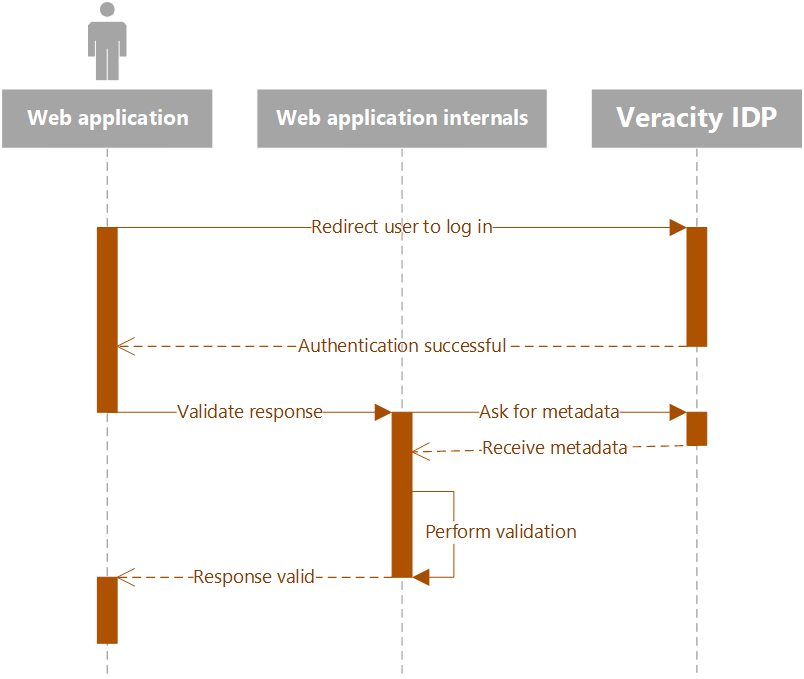
Applications with direct user interaction
Applications that interact directly with users must authenticate them before executing requests on their behalf.
Typical authentication flow:
- Redirect the user to the Veracity IDP login page.
- The user signs in using the identity provider.
- After successful authentication, the Veracity IDP returns a response confirming the user's identity.
- Validate the response in your application.
After successful authentication, the user is redirected back to your application or service.
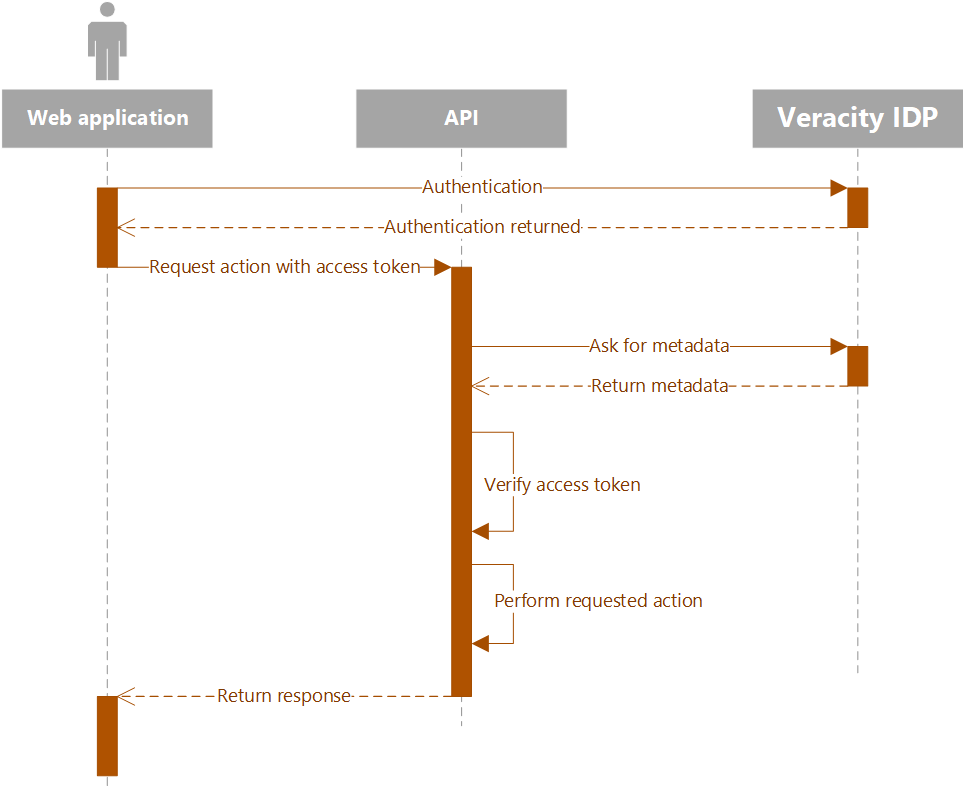
Applications without direct user interaction
Some applications, such as APIs, do not interact directly with users but must still perform actions on their behalf.
In these cases, requests must contain authentication information such as an access token.
For implementation details, see Authentication for APIs.
Authorisation in your application
The Veracity IDP provides authentication for applications registered with the Veracity platform. It does not provide general authorisation, except when accessing other Veracity APIs.
If your application requires authorisation, you must implement it within your own application or service.
For example:
- Use the identity information returned by the Veracity IDP to identify the user.
- Look up the user's permissions in your own database.
The identity token returned by the Veracity IDP contains a claim called userId that uniquely identifies the user.
Authentication parameters
To authenticate API calls, you need the following parameters from the Developer Portal:
Client IDReply URLClient secret(for web applications)
You can obtain these parameters by creating a service in Veracity or by using an existing service.
Get authentication parameters
To view the Client ID or Client secret:
- Open the Developer Portal.
- Select your application or API (it may be grouped within a resource group).
- Open the Settings tab.
To configure the Reply URL:
- Open the Developer Portal.
- Select your application or API.
- Open the Configure tab.
Additional authentication parameters
| Parameter | Value |
|---|---|
| Tenant ID | a68572e3-63ce-4bc1-acdc-b64943502e9d |
| Policy | B2C_1A_SignInWithADFSIdp |
| Services API scope | https://dnvglb2cprod.onmicrosoft.com/83054ebf-1d7b-43f5-82ad-b2bde84d7b75/user_impersonation |
By default, each API can call the Veracity MyServices API.
To call other Veracity platform APIs, you will need subscription keys. To obtain these keys, contact the Veracity onboarding team.
Metadata endpoint
Additional configuration information can be retrieved from the metadata endpoint:
https://login.veracity.com/{tenantid}/v2.0/.well-known/openid-configuration?p={policy}
Replace the placeholders with the following values before calling the endpoint.
| Parameter | Value |
|---|---|
| Tenant ID | a68572e3-63ce-4bc1-acdc-b64943502e9d |
| Policy | B2C_1A_SignInWithADFSIdp |